SearXNG: Self-Hosted Private Search Aggregator

Introduction
SearXNG is a free, open-source metasearch engine that aggregates results from over 70 search engines while respecting your privacy. Unlike traditional search engines, SearXNG doesn’t track your searches, build a profile on you, or serve you advertisements.
When you use popular search engines like Google or Bing, your queries are logged, analysed, and used to build an advertising profile. Even privacy-focused alternatives like DuckDuckGo are proprietary and require trust in a third party. By self-hosting SearXNG, you take complete control over your search experience. Your queries stay on your server, and you can verify exactly what the software does by examining the source code.
One particularly useful feature is SearXNG’s ability to output results as JSON. This makes it an excellent tool for integrating web search capabilities into local LLM applications like Open WebUI, with no need for API keys or worrying about rate limits.
Prerequisites
- Docker version 20.10 or later installed on your system. Newer versions of Docker include the Docker Compose plugin.
- A Linux server (Debian or Ubuntu recommended) or any system capable of running Docker containers.
- Basic familiarity with the terminal.
Verification
Before proceeding with the installation, verify that Docker is installed.
| |
You should see output similar to:
| |
Verify Docker Compose is installed:
| |
Expected output:
| |
Installation
SearXNG uses Redis (or Valkey, a Redis-compatible alternative) for cacheing and rate limiting. The Docker Compose configuration below sets up both services.
Choose or create an appropriate directory, such as ~/self-hosting/searxng.
Create a docker-compose.yaml file:
| |
Note: Adjust the
SEARXNG_BASE_URLenvironment variable to match your server’s IP address or hostname. If you’re deploying on a local network, use your server’s IP (e.g.,http://192.168.0.90:8080/). The port mapping can also be customised—change8080:8080to something like8090:8080if port 8080 is already in use.
Pull the images and start the containers:
| |
Access SearXNG at http://localhost:8080 (or your configured address).
HTTPS
On Private Tailscale Network
If you want free HTTPS without configuring certificates manually, you can use Tailscale Serve. After installing Tailscale on your server:
| |
This exposes your SearXNG instance over HTTPS on your Tailscale network.
On the Public Internet With Caddy
If you want to access your SearXNG instance publicly, it is strongly recommended that you use HTTPS. You can achieve this with a reverse proxy like Caddy, especially if you have it configured with the rate-limit plugin.
Features and Use Cases
SearXNG offers several interesting advantages over traditional search engines.
Ad-Free Search Results
All search results pass through your server, which means you see the actual results with no sponsored content or advertisements. This alone makes self-hosting worthwhile. You do not need to scroll past “promoted results” to find what you’re actually looking for.
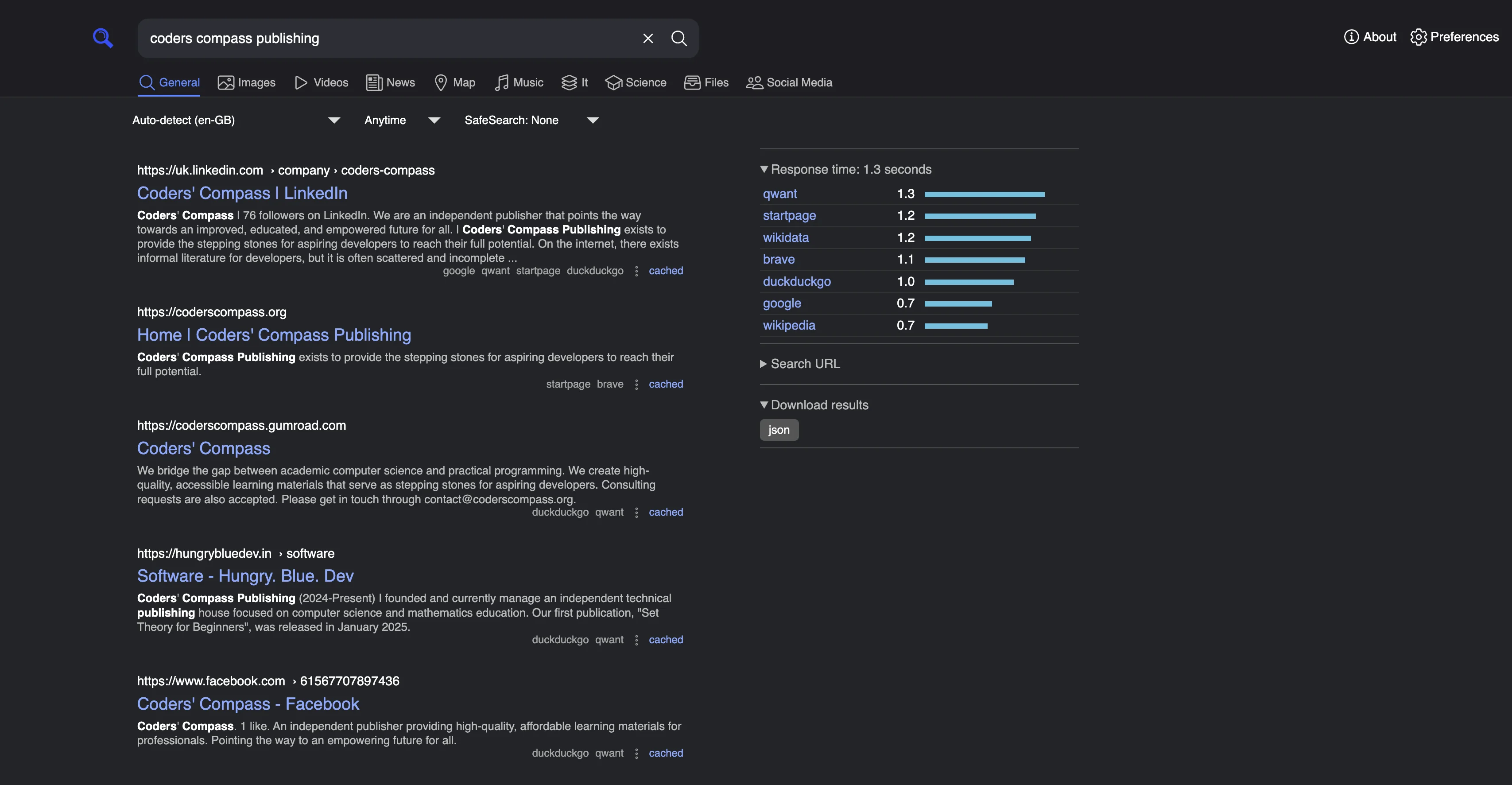
Search results aggregated from Google, Qwant, Startpage, and DuckDuckGo. Completely ad-free.
LLM Integration via JSON API
SearXNG can output search results as JSON, making it trivial to integrate with local LLM applications. If you’re running Open WebUI or similar tools, you can use SearXNG as a web search backend without:
- Paying for API access to search providers
- Managing API keys
- Hitting rate limits
You can perform a (practically) unlimited number of searches through your own instance. The JSON output (look up how to enable it) includes useful metadata like which engines returned each result, relevance scores, and content snippets.
Aggregated Multi-Engine Results
Depending on your configuration, SearXNG queries multiple search engines simultaneously and combines the results. This provides several benefits:
- Results that are heavily weighted on one engine might not appear prominently on others. Aggregation surfaces these differences.
- You get a more comprehensive view of information.
- If one engine has poor coverage for a topic, others may fill the gap.
The default configuration queries Google, Bing, DuckDuckGo, Qwant, Startpage, and many others. You can customise which engines to use through the settings interface.
Privacy Considerations
While SearXNG prevents search engines from tracking your queries directly, there’s an important caveat: your IP address is still visible to the search engines when SearXNG queries them on your behalf. This means search providers might still build a profile based on the searches coming from your server’s IP.
To mitigate this, consider one of the following approaches:
- Use a VPN container: Run Gluetun alongside SearXNG to route all search queries through a VPN. This masks your server’s IP address.
- Use a shared VPN exit node: If you have access to a VPN service with shared IP addresses, your queries will blend in with traffic from other users.
This might be overkill for most home users. The benefits of no tracking cookies, personalised advertising, or search history are already a substantial improvement over using search engines directly. It is worth partially implementing this over not implementing this at all.
Supporting the Project
SearXNG is maintained by a volunteer community. The project doesn’t appear to have a direct donation mechanism, but you can support it in other ways:
- Contribute code: The project is written primarily in Python and welcomes contributions on GitHub.
- Report bugs and suggest features: Use the issue tracker to help improve the project.
- Help with translations: SearXNG supports multiple languages, and translation contributions are always welcome.
- Join the community: The Matrix channel (#searxng:matrix.org) is active and welcoming to newcomers.
Running a public instance (if you have the resources) also helps the broader community access privacy-respecting search.
Conclusion
SearXNG provides a practical way to reclaim control over your search experience. The deployment is straightforward with Docker Compose, and the benefits are immediate: ad-free results, no tracking, and a free web search API.
SearXNG is worth considering for those who are concerned about privacy or wish to avoid advertisements. Self-hosting offers the advantage of integrating with local LLMs for web search. The configuration above should get you running in under ten minutes.
Have you set up SearXNG or another privacy-focused search solution? Share your experience in the comments.
Comments